




You paid for the design. The hosting is sorted. Maybe you’ve even put some money behind ads to drive traffic to it.
And the form still sits empty.
Here’s the thing most business owners get wrong at this point: they assume the answer is more traffic. Push harder on ads, chase a few more keyword rankings, and post more on social. But in almost every audit we run at BrandXpart, the site already has visitors. People are showing up. They’re just not doing anything once they get there.
That’s a different problem, and it needs a different fix. Let’s go through it properly.
Figure Out What’s Actually Broken Before You Touch Anything
This sounds obvious, but it’s the step almost everyone skips. There are really only three ways a lead pipeline breaks down:
Not enough people are visiting. Visitors show up but leave without doing anything. Or — and this one catches people off guard — leads do come in, but nobody gets back to them fast enough for it to matter.
Pull up your analytics. Look at monthly sessions, your form conversion rate, and honestly ask how long it takes someone on your team to respond to a new inquiry. Those three numbers alone will tell you which of the three you’re dealing with.
If it turns out traffic really is the issue, we’ve written about that separately in Low Website Traffic? Proven Solutions That Actually Work. And if you’re not sure where visitors are actually dropping off, a proper SEO Audit & Reporting will show you the exact page where people lose interest.
For most businesses, though, the leak isn’t traffic. It’s everything below.
People Land on Your Site and Have No Idea What You Do

Someone clicks through to your homepage. They’ve got maybe 4 seconds to decide whether to stay or bounce back to Google.
They’re not reading your mission statement in that window. They’re not admiring the hero photo. They’re scanning for one thing — is this the right place for what I need — and if the answer isn’t obvious immediately, they’re gone.
This happens constantly. Homepages are built around clever taglines rather than clear sentences. Stock photos of handshakes stand in for an actual explanation of the service. Copy that talks proudly about “10 years of excellence” before ever mentioning what problem the business actually solves.
Lead with what you do and who it’s for. Plainly. Save the story about your company’s journey for the About page — nobody’s reading that on their first visit anyway.
Visitors Don’t Know What to Do Next
Say someone actually likes what they see. Now what?
If your site gives them five equally weighted options — call, email, live chat, download a brochure, follow us on Instagram — you’ve handed them a decision to make rather than a next step. Most people won’t make that decision. They’ll just close the tab.
The fix isn’t complicated: one clear action per page, and make it specific. “Get a Free Audit” does more work than “Submit” ever will. This is basically the entire point of proper Conversion Rate Optimization (CRO) — not adding more to a page, but cutting until only the one thing that matters is left.
Your Homepage Is Doing a Landing Page’s Job
If every visitor, no matter how they found you, ends up on the same general homepage, you’re missing one of the easiest wins available.
A page built around one specific offer for one specific audience will always outperform a homepage trying to be everything to everyone. It’s not more design, it’s less — fewer distractions, one message, one action.
This is exactly what Landing Page Design is for. If you’re running a campaign or promoting a specific service and sending that traffic to your homepage, you’re probably losing a good chunk of it before it ever gets a real chance to convert.
Your Form Is Asking for More Than It Should
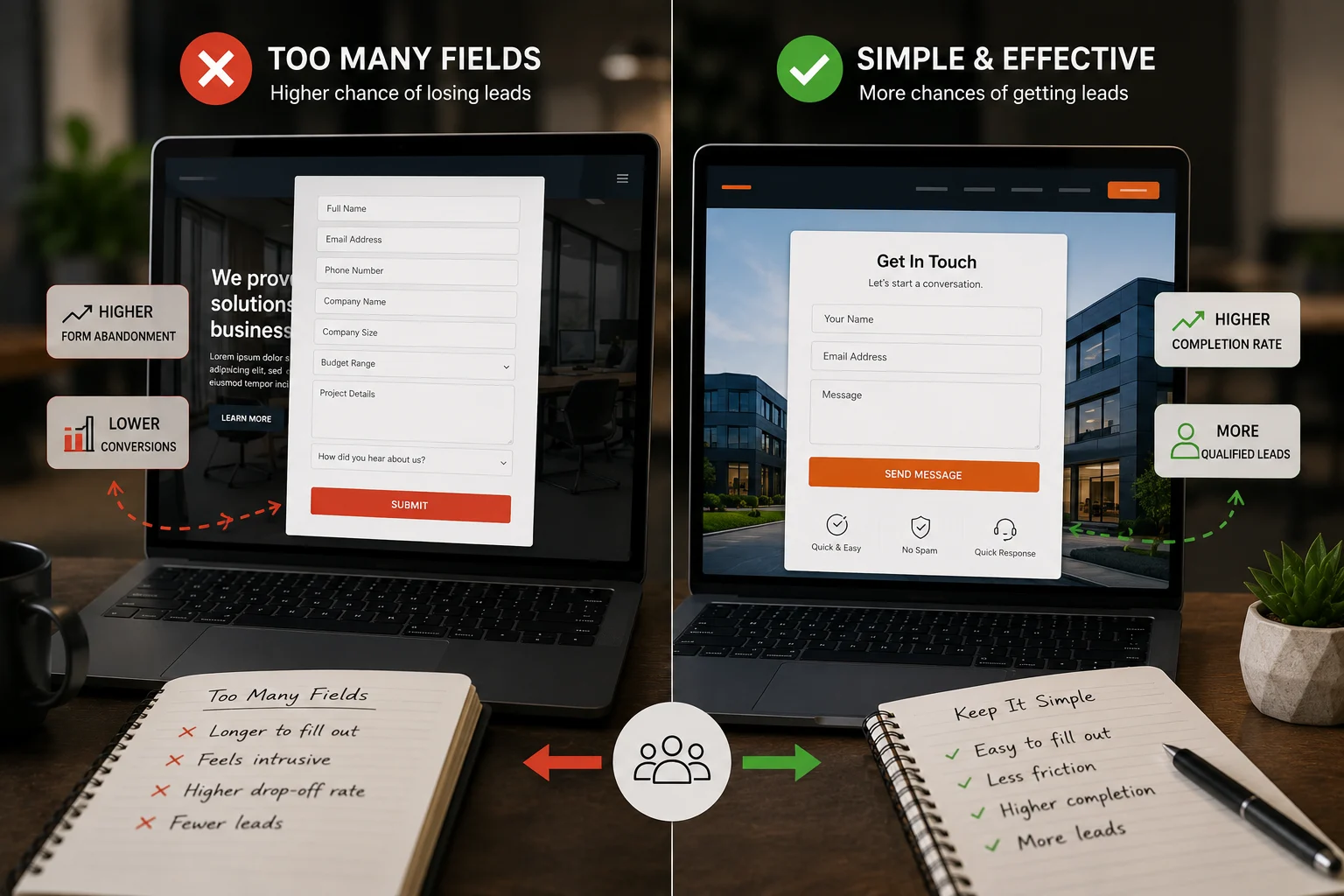
Every extra field on a contact form costs you something. Not a lot on its own, but it adds up — and asking for someone’s budget, company size, or a detailed project brief before they’ve even had a conversation with you is asking too much, too early.
Name, email, one message field. That’s usually enough to start. Whatever else you think you need to know can wait for the actual call.
There’s No Proof Anywhere Near the Point of Decision
People don’t hand over their contact details to a business they’re not sure about. And most visitors are, by default, not sure — they’ve never worked with you before, so why would they be?
If your testimonials and case studies are sitting on a separate “Testimonials” page nobody visits, they’re not doing anything for you. They need to be near the form, near the pricing, near wherever the visitor is actually deciding.
And it has to be real. A named client with a specific result beats a vague “trusted by 500+ businesses” claim every time — anyone can write that second one, and increasingly, people know it.
The Site Is Slow, or Breaks on Mobile
Most of your traffic is coming from a phone. If the site is slow to load or awkward to use on a smaller screen, nobody’s going to email you to complain about it — they’ll just leave, and you’ll never know it happened.
Open your own site on your own phone. Actually, try to fill out the contact form with your thumb. If it’s annoying for you, someone with three other tabs open and zero patience isn’t going to push through it.
If the whole site was never really built with mobile and speed in mind — not just a “responsive” theme, but genuinely built for it — patching individual pages only gets you so far. That’s usually when a proper Website Redesign is worth the investment, rather than another year of small fixes on an old foundation.
You’re Getting Traffic, Just Not the Right Kind
This one’s sneaky because the numbers look fine. Sessions are up, rankings are improving, and leads still aren’t coming.
Look at which pages bring the most traffic, then look at which pages actually generate enquiries. If those two lists barely overlap, that’s your answer — you’re ranking for terms that attract browsers, not buyers.
Getting this right means building your keyword strategy around what someone searches for right before they’re ready to act, not just what has the highest search volume. That’s the difference between Keyword Research & Content Planning done properly and just chasing rankings for their own sake.
The Lead Comes In, and Then Nothing Happens for Two Days
This is the one that has nothing to do with your website, and it’s more common than people admit.
The form works. The email arrives. And then it sits in someone’s inbox until Thursday, by which point the person who filled it out has already had a call with two competitors.
Speed matters here more than almost anything else in this list. A fast response turns a form submission into an actual conversation; a slow one turns it into a lead you paid for and never got to use. If your lead generation efforts stop at the ad spend and don’t account for what happens after someone raises their hand, you’re leaving money on the table before the sale even starts. This is the gap real Lead Generation Campaigns work is meant to close.
So, Fix It — Or Rebuild It?

Most of what’s above doesn’t require tearing your site down and starting over. Messaging, forms, CTAs, trust signals — these are patchable.
But if you’ve already tried patching things and nothing’s moved, or the site is genuinely old, slow, and hard to update, that’s a different conversation. At that point a Website Redesign built around conversion from day one is usually faster than continuing to chase small fixes on a foundation that was never built for this.
The Real Takeaway
A website that isn’t generating leads almost never has one big, dramatic flaw. It’s usually three or four small things stacked on top of each other — a vague headline, a form with too many fields, a slow mobile page, a lead that sat unanswered for two days.
None of it needs guesswork to fix. Figure out which problem you actually have, fix the one costing you the most first, and move to the next.
If your traffic looks healthy but the leads aren’t showing up, the issue isn’t your audience. It’s what happens between the click and the form — and that’s a much easier fix than most people expect.
Want someone to actually look at yours? Book a free consultation, and we’ll walk through where it’s leaking.
A Few Questions People Usually Ask
My website gets traffic but no leads — what’s going on? Nine times out of ten it’s a conversion issue, not a traffic issue. Unclear messaging, a weak or missing CTA, slow load times, and no trust signals are the usual suspects — check those before assuming you need more visitors.
Do I need a full redesign, or can this be fixed on the current site? Usually it can be fixed without rebuilding anything. A full redesign is worth it when the site is genuinely outdated, slow on mobile, or technically holding back your SEO — not just because conversions are lower than you’d like.
How fast should I really be responding to a new lead? Within the hour if you can manage it. The longer it sits, the more likely they’ve already spoken to someone else.
Should campaign traffic go to my homepage or a dedicated landing page? A dedicated landing page built around one offer will almost always convert better than sending that traffic to a general homepage.
How do I tell if it’s a traffic problem or a conversion problem? Check your sessions and form conversion rate. Low sessions with no leads points to visibility — worth a free consultation to dig into. Decent traffic with no leads means the site itself is the issue.